
Learn from practice quizzes — don't just answer them
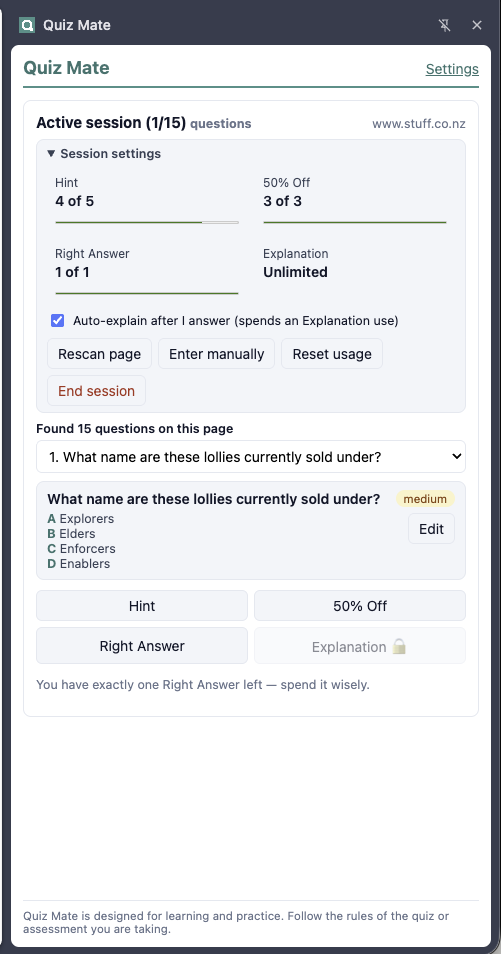
Quiz Mate lives in a Chrome side panel next to your practice quiz. It scans the visible question, you confirm the text, and then you choose the kind of help you want. It never clicks, selects, or submits anything on the page.
- Hint A useful clue and concept refresher that never reveals the answer.
- 50% Off Eliminates up to half of the options, with a short reason for each.
- Right Answer Recommends the most likely option with confidence and reasoning.
- Explanation Teaches the concept and explains every option — unlocked after you answer, so you always attempt the question yourself first.
Built for studying, not cheating yourself
Before each session you decide how many times each kind of help may be used — for example five hints but only one Right Answer. Counters tick down only when a request succeeds, and the final Right Answer asks for confirmation before it is spent. Optional auto-explain gives you a full explanation the moment you answer a question.
Private by design
There is no Quiz Mate server, no account, no analytics, and no history kept. The page is read only when you click Scan, and only the question and options you confirm are sent — to Anthropic, using your own API key, and nowhere else. Read the full privacy policy.
Getting started
Quiz Mate is awaiting review on the Chrome Web Store — this page will link to the listing as soon as it is published. You will need an Anthropic API key from platform.claude.com.
Responsible use: Quiz Mate is designed for learning and practice. Follow the rules of the quiz or assessment you are taking. Do not use it in proctored, graded, certification, employment, citizenship, licence, or otherwise restricted assessments where outside assistance is prohibited.